**Introduction to CSS**
Introduction to CSS
1. Container Element
The HTML **div **element defines a container.
<div>
  <h1>Tourism</h1>
  <p>Plan your trip wherever you want to go</p>
  <button>Get Started</button>
</div>
CSS Properties
CSS selectors are used to "find" (or select) the HTML elements you want to style.
- Class Selector
selector {
  property1: value1; # Declaration Block
  property2: value2;
}
CSS Text Properties
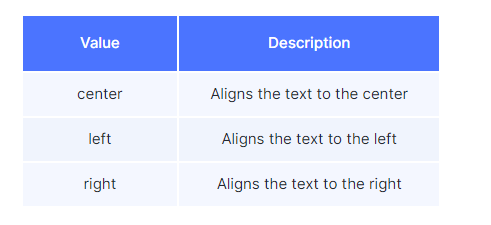
1. Text Align
The CSS text-align property specifies the horizontal alignment of the text in an HTML element.
.h-center {
  text-align: center;
}
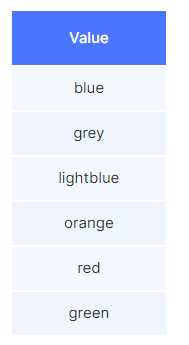
2. Color
The CSS **color **property specifies the color of the text.
.main-heading {
  color: blue;
}
.paragraph {
  color: grey;
}
Sample Colors
CSS Colors
1. Hex Code
CSS Colors can be represented in multiple ways:
- Color names
- Hex Code
- HSL
- RGB and many more...
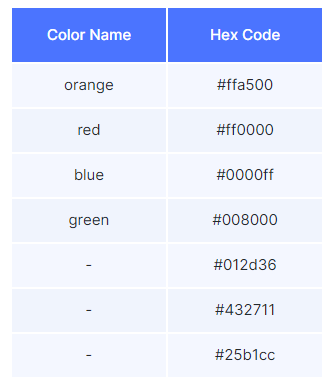
Since few colors have the Color names, Hex Codes make a good alternative to pick a wide variety of colors.
Some of the Color names and their Hex Codes are:
.button {
  color: #25b1cc;
}
How to pick a color using Hex Code
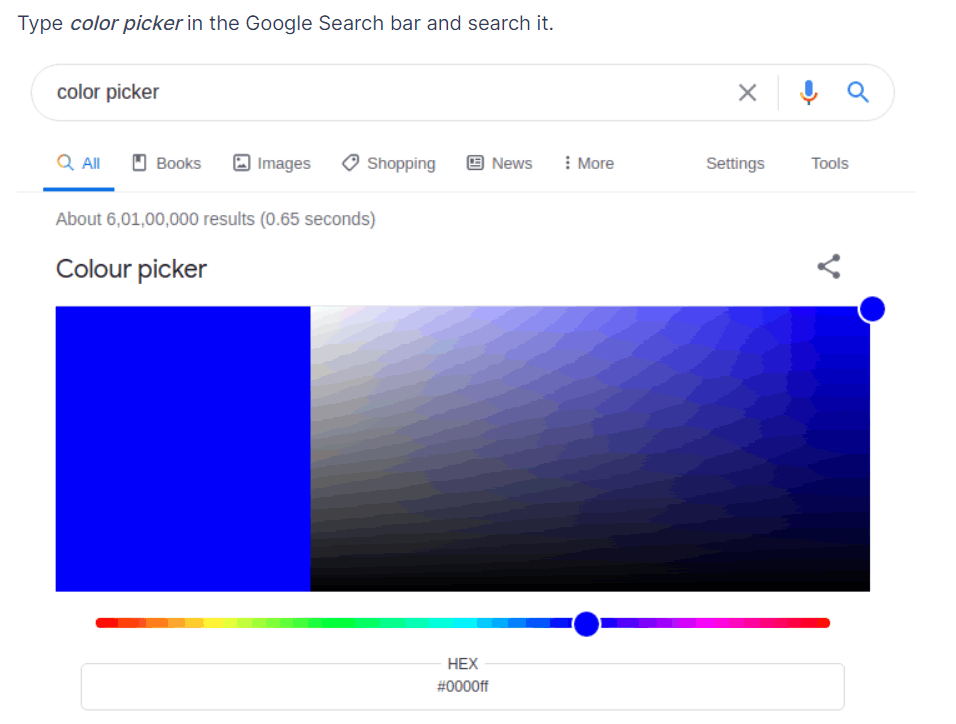
The color picker lets you pick a color among the approximately 16,777,216 colors available.
One of the simplest ways to access a color picker is:
Type color picker in the Google Search bar and search it.
3. Font Family
The CSS font-family property specifies the font for an element.
@import url("https://fonts.googleapis.com/css2?family=Bree+Serif&family=Caveat:wght@400;700&family=Lobster&family=Monoton&family=Open+Sans:ital,wght@0,400;0,700;1,400;1,700&family=Playfair+Display+SC:ital,wght@0,400;0,700;1,700&family=Playfair+Display:ital,wght@0,400;0,700;1,700&family=Roboto:ital,wght@0,400;0,700;1,400;1,700&family=Source+Sans+Pro:ital,wght@0,400;0,700;1,700&family=Work+Sans:ital,wght@0,400;0,700;1,700&display=swap");
.main-heading {
  font-family: "Roboto";
}
.paragraph {
  font-family: "Roboto";
}
You can use one of the below values of the font-family property
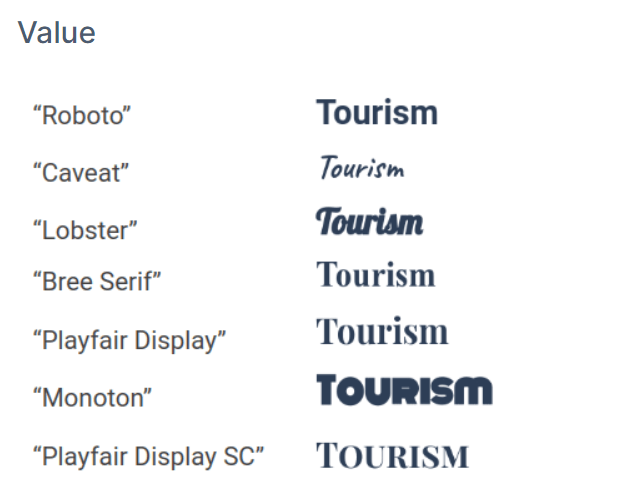
Note
- To use font families, you need to import their style sheets into your CSS file.
- There shouldn't be any spelling mistakes in the values of the font-family property.
- There must be quotations around the value of the font-family property.
4. Font Size
The CSS font-size property specifies the size of the font.
.main-heading {
  font-size: 36px;
}
.paragraph {
  font-size: 28px;
}
5. Font Style
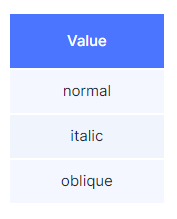
The CSS font-style property specifies the font style for a text.
You can use one of the below values of the font-style
property.
.main-heading {
  font-style: italic;
}
.paragraph {
  font-style: normal;
}
6. Font Weight
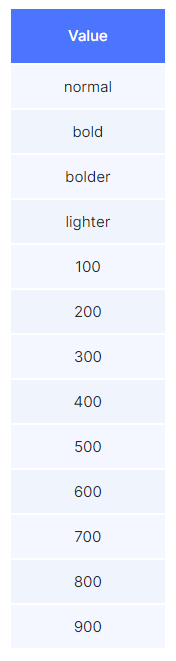
The CSS font-weight property specifies how thick or thin characters in text should be displayed.
.main-heading {
  font-weight: bold;
}
.paragraph {
  font-weight: 200;
}
You can use one of the below values of the font-weight property
Note
- There shouldn't be any spelling mistakes in the values of the font-weight property.
- There shouldn't be any quotations around the value of the font-weight property.
- The numerical values given to the font-weight property must be in the range from 100 to 900 and should be the multiples of 100.
7. Text Decoration
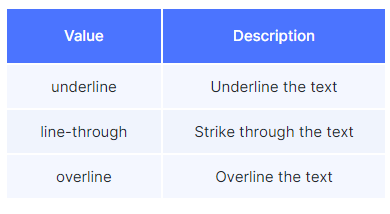
The CSS text-decoration property specifies the decoration added to the text.
.main-heading {
  text-decoration: underline;
}
.paragraph {
  text-decoration: overline;
}
You can use one of the below values of the text-decoration property,
Note
- There shouldn't be any spelling mistakes in the values of the text-decoration property.
- There shouldn't be any quotations around the value of the text-decoration property.
- Ensure that text-decoration and line-through are hyphenated.
CSS Background Properties
Background Property
1.Background Color
The CSS background-color property specifies the background color of an HTML element.
.card {
  background-color: lightblue;
}
2. Background Image
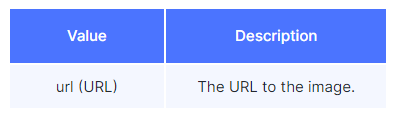
The CSS **background-image **property specifies the background image of an HTML element.
.card {
  background-image: url("https://d1tgh8fmlzexmh.cloudfront.net/ccbp-static-website/ocean.jpg");
}
Warning
- The background image takes the height of the content of an HTML element if you don't specify the height to it.
- The URL given to the background-image must be a valid URL to display the image.
3. Background Size
The CSS **background-size **property specifies the size of the background image of an HTML element.

Note
Aspect Ratio is the ratio of the width and height (width/height) of an image.
HTML
<!DOCTYPE html>
<html>
  <head></head>
  <body>
    <div class="card">
      <h1>Tourism</h1>
      <p>Plan your trip wherever you want to go</p>
      <button>Get Started</button>
    </div>
  </body>
</html>
CSS
.card {
  background-image: url("https://d1tgh8fmlzexmh.cloudfront.net/ccbp-static-website/ocean.jpg");
  background-size: cover;
  width: 250px;
  height: 200px;
}