MongoDB: From Documents to Distributed Clusters 🚀
MongoDB: From Documents to Distributed Clusters 🚀

Goal: Go beyond “it’s a JSON database” and understand MongoDB’s internal mechanics, scaling strategies, indexing, and aggregation. 🧠
1. Philosophy & Document Model 📘
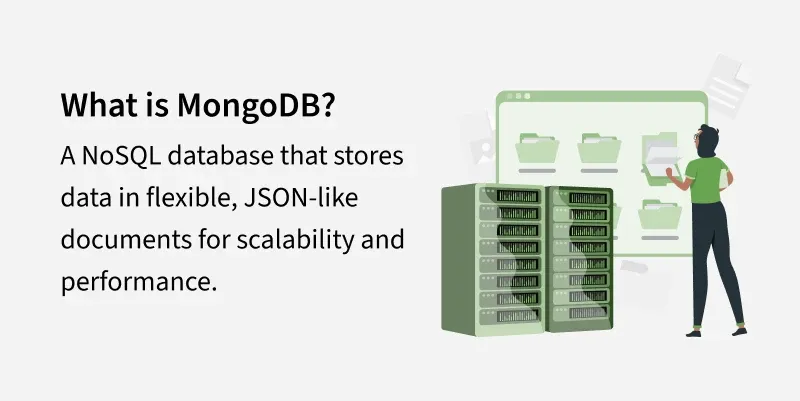
Why MongoDB? (Significance) 🎯
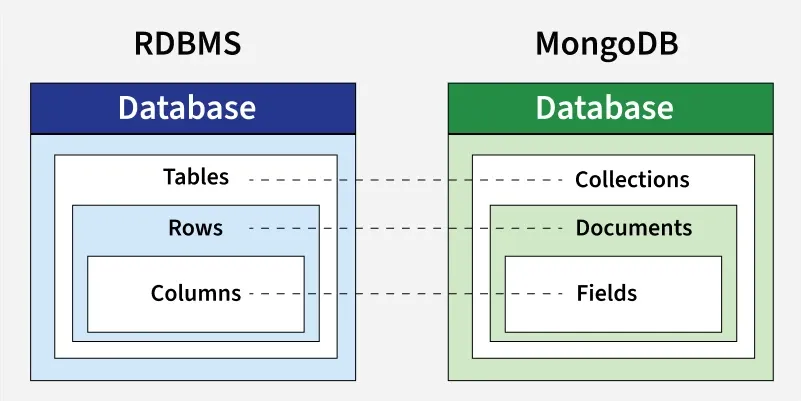
Relational databases normalize data across many tables (e.g., Users, Orders, Payments) and rely on JOINs. At scale, JOINs can be expensive. MongoDB’s guiding principle is:
Data that is accessed together should be stored together. 📦
Benefits:Aligns naturally with object-oriented models 🧩
Reduces impedance mismatch 🔧
Fewer JOINs → faster reads ⚡
BSON (Binary JSON) 🧱
MongoDB stores data as BSON (not plain JSON).
Why BSON?
- Rich data types: Date, Binary, Int32/Int64/Decimal128, ObjectId, etc. 🧬
- Faster traversal than text JSON 🏃
- Optimized for indexing and storage 📦
The _id Field (ObjectId) 🔑
- 12 bytes: 4 bytes timestamp, 5 bytes random, 3 bytes counter
- Creation time can be extracted from
_id⏲️
Json:
{
    "name": "Spring Boot",
    "completed": false,
    "videos": 160,
    "likes": 10400,
    "registrations": 4600,
    "instructors": ["Prakash"],
    "tech": ["Java", "Spring"],
    "level": "Advanced"
  }
MQl:
{
    name: "Spring Boot",
    completed: false,
    videos: 160,
    likes: 10400,
    registrations: 4600,
    instructors: ["Prakash"],
    tech: ["Java", "Spring"],
    level: "Advanced",
    date:Date()
  }
2. Core Mechanics & CRUD 🛠️
CRUD Operations 🔄
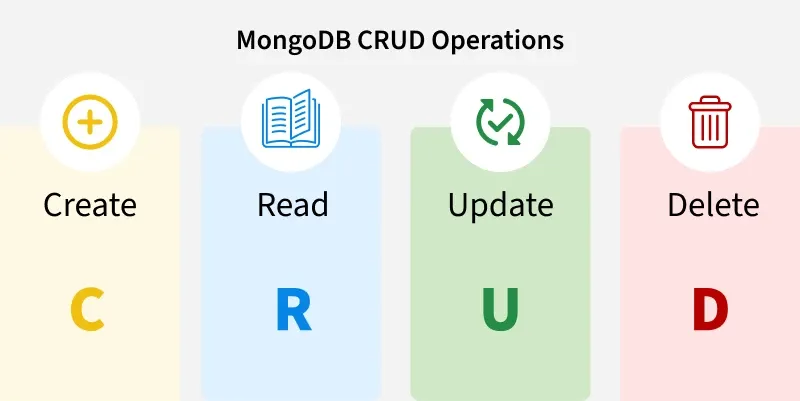
Insert ➕
insertOne()insertMany()(atomic per-document)
Update operators (key ones) ✏️
$set→ update specific fields$inc→ atomic increments (safe for concurrency)$push→ append to arrays$addToSet→ append if not present$unset→ remove fields
Atomicity example 🔒
// BAD: Read-modify-write (race condition)
let user = db.users.findOne({ _id: 1 });
user.visits++;
db.users.save(user);

// GOOD: Atomic operator
db.users.updateOne(
  { _id: 1 },
  { $inc: { visits: 1 } }
);
Schema Design: Embed vs Reference 🧱🔗
Embedding (default) 📚
- Fast reads ⚡
- Single query fetches all related data 🎯
- Bound by 16MB document size
- Ideal when relationship is bounded and frequently read together
Referencing 🔗
- Better for unbounded growth (logs, events, analytics)
- Avoids document bloat
- Requires additional queries or aggregation
$lookupwhen joining
Rule of thumb:
- Embed when data is mostly read together and bounded 📚
- Reference when data grows without bound or is shared across many parents 🔗
3. Aggregation Framework 📊
Concept 🧠
- Aggregation is a pipeline of stages, similar to Linux pipes:
Input → Filter → Group → Transform → Output
Key stages 🧱
$match→ filter early (use indexes) 🧹$group→ aggregate 🧮$lookup→ left outer join across collections 🔍$project→ reshape fields 🧭$sort→ ordering (ideally with supporting index) 📑
Example: Total Revenue per Category 💵📦
db.orders.aggregate([
  { $match: { status: "completed" } },
  { $group: {
      _id: "$product_category",
      totalRevenue: { $sum: "$amount" }
  }},
  { $sort: { totalRevenue: -1 } }
]);
Note ℹ️
- Aggregation runs inside MongoDB’s C++ engine and is typically much faster than app-side processing.
- Place
$matchas early as possible to reduce the working set.
4. Indexing (Performance Core) 🏎️
The Problem: Collection Scan (COLLSCAN) 🔍
Without indexes, MongoDB scans every document:
- Complexity: O(N)
- CPU spikes, disk I/O bottlenecks, poor latency at scale
Analogy: Searching a shuffled phone book page by page.
The Solution: B-Tree Index (IXSCAN) 🌲
MongoDB uses B-Tree indexes.
Index stores:
- Indexed field value
- Pointer to document location
Complexity:
- O(log N)
- 1M docs ≈ ~20 steps; 1B docs ≈ ~30 steps
- Scales with minimal performance cost
Query Execution: COLLSCAN vs IXSCAN 🧪
- COLLSCAN (Collection Scan) ❌
- Scans all documents
- Time complexity: O(N)
- Degrades with dataset size
Example (No index)
db.courses.find({ name: "kubernetes" }).explain("executionStats")
// Key fields (conceptually)
stage: COLLSCAN
totalDocsExamined: 43
nReturned: 1
totalKeysExamined: 0
Interpretation 🧩:
- MongoDB examined 43 docs to return 1 result → inefficient.
Problems ⚠️:
- High CPU, heavy I/O, slow APIs, not production-ready at scale.
- IXSCAN (Index Scan) ✅
- Uses index for lookup
- Time complexity: O(log N)
- Scales well with large datasets
Create index:
db.courses.createIndex({ name: 1 })Example (With index)
db.courses.find({ name: "kubernetes" }).explain("executionStats")
// Key fields (conceptually)
stage: FETCH
inputStage: IXSCAN
totalDocsExamined: 1
totalKeysExamined: 1
nReturned: 1
Interpretation 🧩:
- Index found the key “kubernetes”; FETCH retrieved the document.
Why FETCH appears with IXSCAN? 🤔
- Indexes don’t store full documents, only keys and pointers.
- IXSCAN → find pointer; FETCH → load document.
- Covered Query (No FETCH)
A query is covered when:
- All requested fields are in the index
- MongoDB does not fetch the document
Example:
db.courses.createIndex({ name: 1 })
db.courses.find(
  { name: "kubernetes" },
  { _id: 0, name: 1 }
).explain("executionStats")
// stage: IXSCAN (no FETCH)
Fastest possible query for that access pattern.
Key comparison 📊
- Uses Index: COLLSCAN ❌ vs IXSCAN ✅
- Docs Examined: All vs Only matching
- Complexity: O(N) vs O(log N)
- Production readiness: COLLSCAN ❌ vs IXSCAN ✅
Golden performance rule 🎯
- Aim for
totalDocsExamined == nReturned - If not equal, check indexes and query shape.
Compound Indexes & ESR Rule 🧩
Field order matters.
ESR Rule:
- E – Equality: exact match fields first
- S – Sort: fields used for sort next
- R – Range: range predicates last
Correct ordering avoids expensive in-memory sorts and maximizes index utility.
Index Trade-Offs ⚖️
Indexes improve reads but add write overhead.
Each write must:
- Write the document
- Update every relevant index
Too many indexes can cause:
- Slower writes
- Higher RAM usage
- Disk swapping if index working set exceeds RAM
Verification with explain() 🔎
Use:
db.collection.find(query).explain("executionStats")
Check:totalDocsExamined,totalKeysExamined,nReturned
Goal:totalDocsExamined == nReturnedfor selective queries
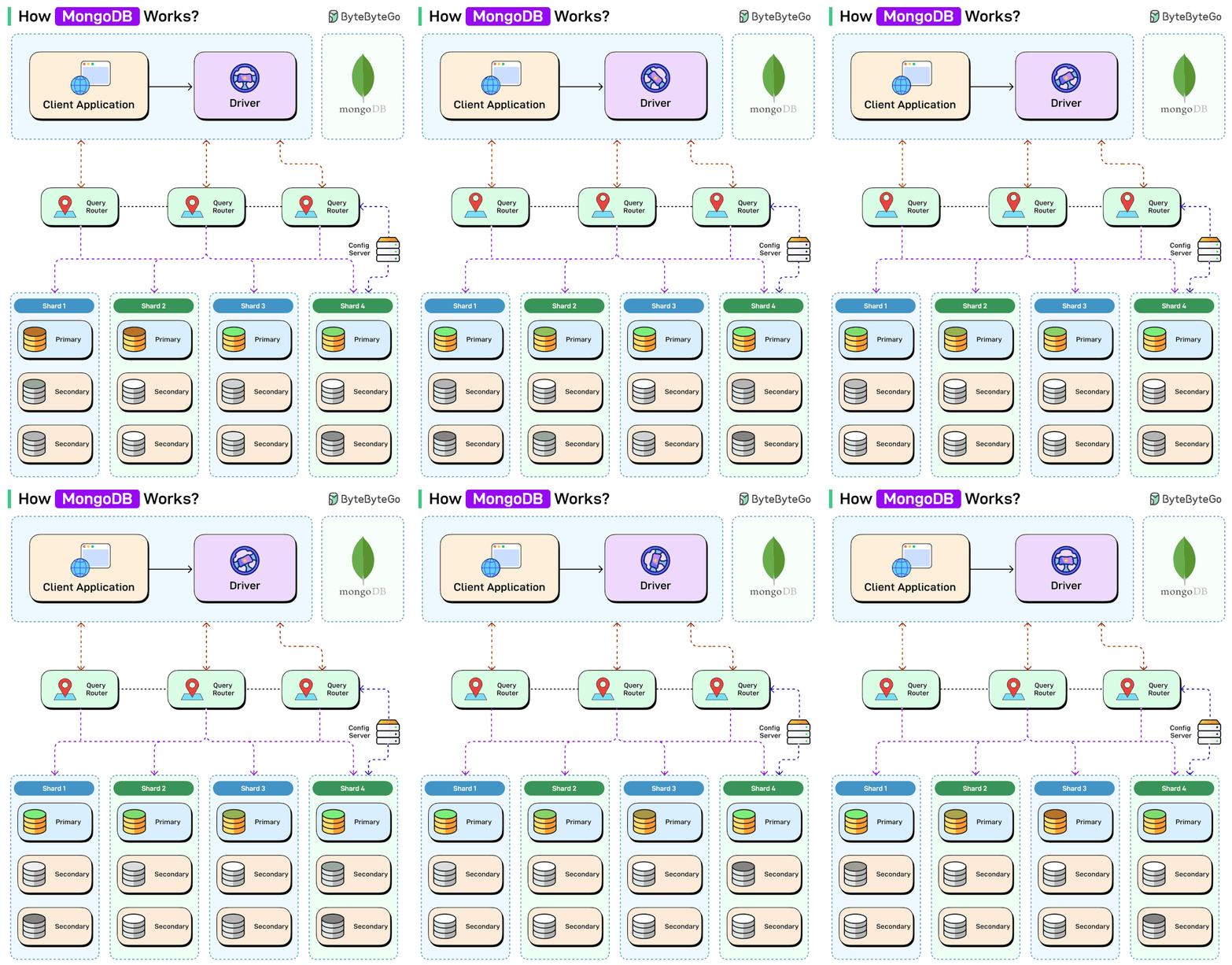
5. Architecture: Replication & Sharding 🏗️
Replication (High Availability) 🔁
Replica set roles:
- Primary → handles writes
- Secondary → replicates data
- Automatic election on failure
Oplog 📝:
- Primary writes operations to the oplog
- Secondaries tail the oplog to stay in sync
Read preferences 📖:
- Reads can be routed to secondaries (with consistency caveats)
Sharding (Horizontal Scaling) 🧩
Problem ❗:
- Single server cannot handle massive datasets or throughput.
Solution ✅:

- Split data across shards.
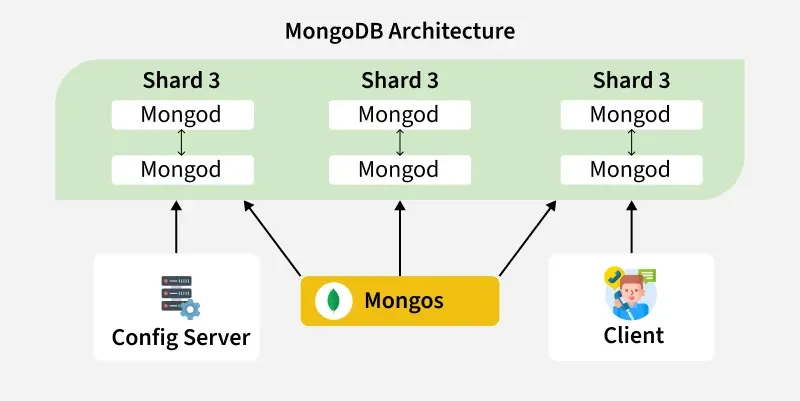
Components 🧰:
mongos→ query router- Config servers → metadata
- Shards → data storage
Shard Key 🔑:
- Critical design decision
- Poor choice causes hot shards and bottlenecks
- Prefer keys with good cardinality and balanced distribution
6. Advanced & Modern Features ✨
Multi-Document ACID Transactions 🔒
- Supported since MongoDB 4.0
- Snapshot isolation
- Commit/rollback
Use cases 💼:
- Financial systems, inventory, multi-document consistency
Time Series Collections ⏱️
Optimized for:
- IoT sensors, logs, stock prices
Benefits:
- Automatic compression
- High write throughput
- Efficient storage layout
Atlas Vector Search (GenAI) 🧠
- Stores vector embeddings
- Enables semantic similarity search
- Used in AI/LLM applications
7. Final Takeaways 📌
- NoSQL = Not Only SQL
- Schema validation is optional but powerful
- Indexes are mandatory for performance
- MongoDB excels at large-scale, evolving, semi-structured data
Best fit 👍:
- User profiles
- Product catalogs
- Content platforms
- IoT & real-time systems
SQL still best for 🏦:
- Strong relational integrity
- Highly structured financial systems
How MongoDB works
MongoDB Queries
Getting Started
Connect MongoDB Shell
mongo # connects to mongodb://127.0.0.1:27017 by defaultmongo --host <host> --port <port> -u <user> -p <pwd> # omit the password if you want a promptmongo "mongodb://192.168.1.1:27017"mongo "mongodb+srv://cluster-name.abcde.mongodb.net/<dbname>" --username <username> # MongoDB AtlasHelpers
Show dbs :
db // prints the current databaseSwitch database :
use <database_name>Show collections :
show collectionsRun JavaScript file :
load("myScript.js")Crud
Create
db.coll.insertOne({name: "Max"})
db.coll.insertMany([{name: "Max"}, {name:"Alex"}]) // ordered bulk insert
db.coll.insertMany([{name: "Max"}, {name:"Alex"}], {ordered: false}) // unordered bulk insert
db.coll.insertOne({date: ISODate()})
db.coll.insertMany({name: "Max"}, {"writeConcern": {"w": "majority", "wtimeout": 5000}})
Delete
db.coll.deleteOne({name: "Max"})
db.coll.deleteMany( $and: [{name: "Max"}, {justOne: true}]) //delete all entries which contain both values
db.coll.deleteMany( $or: [{name: "Max"}, {justOne: true}])  //delete all entries which contain any of the specified values
db.coll.deleteMany({}) // WARNING! Deletes all the docs but not the collection itself and its index definitions
db.coll.deleteMany({name: "Max"}, {"writeConcern": {"w": "majority", "wtimeout": 5000}})
db.coll.findOneAndDelete({"name": "Max"})
Update
db.coll.updateMany({"_id": 1}, {$set: {"year": 2016}}) // WARNING! Replaces the entire document where "_id" = 1
db.coll.updateOne({"_id": 1}, {$set: {"year": 2016, name: "Max"}})
db.coll.updateOne({"_id": 1}, {$unset: {"year": 1}})
db.coll.updateOne({"_id": 1}, {$rename: {"year": "date"} })
db.coll.updateOne({"_id": 1}, {$inc: {"year": 5}})
db.coll.updateOne({"_id": 1}, {$mul: {price: 2}})
db.coll.updateOne({"_id": 1}, {$min: {"imdb": 5}})
db.coll.updateOne({"_id": 1}, {$max: {"imdb": 8}})
db.coll.updateMany({"_id": {$lt: 10}}, {$set: {"lastModified": ISODate()}})
Array
db.coll.updateOne({"_id": 1}, {$push :{"array": 1}})
db.coll.updateOne({"_id": 1}, {$pull :{"array": 1}})
db.coll.updateOne({"_id": 1}, {$addToSet :{"array": 2}})
db.coll.updateOne({"_id": 1}, {$pop: {"array": 1}})  // last element
db.coll.updateOne({"_id": 1}, {$pop: {"array": -1}}) // first element
db.coll.updateOne({"_id": 1}, {$pullAll: {"array" :[3, 4, 5]}})
db.coll.updateOne({"_id": 1}, {$push: {scores: {$each: [90, 92, 85]}}})
db.coll.updateOne({"_id": 1, "grades": 80}, {$set: {"grades.$": 82}})
db.coll.updateMany({}, {$inc: {"grades.$[]": 10}})
db.coll.updateMany({}, {$set: {"grades.$[element]": 100}}, {arrayFilters: [{"element": {$gte: 100}}]})
Update many
db.coll.updateMany({"year": 1999}, {$set: {"decade": "90's"}})FindOneAndUpdate
db.coll.findOneAndUpdate({"name": "Max"}, {$inc: {"points": 5}}, {returnNewDocument: true})Upsert
db.coll.updateOne({"_id": 1}, {$set: {item: "apple"}, $setOnInsert: {defaultQty: 100}}, {upsert: true})Replace
db.coll.replaceOne({"name": "Max"}, {"firstname": "Maxime", "surname": "Beugnet"})Write concern
db.coll.updateMany({}, {$set: {"x": 1}}, {"writeConcern": {"w": "majority", "wtimeout": 5000}})Find
db.coll.findOne() // returns a single document
db.coll.find()    // returns a cursor - show 20 results - "it" to display more
db.coll.find().pretty()
db.coll.find({name: "Max", age: 32}) // implicit logical "AND".
db.coll.find({date: ISODate("2020-09-25T13:57:17.180Z")})
db.coll.find({name: "Max", age: 32}).explain("executionStats") // or "queryPlanner" or "allPlansExecution"
db.coll.distinct("name")
Count
db.coll.estimatedDocumentCount()  // estimation based on collection metadata
db.coll.countDocuments({age: 32}) // alias for an aggregation pipeline - accurate count
Comparison
db.coll.find({"year": {$gt: 1970}})
db.coll.find({"year": {$gte: 1970}})
db.coll.find({"year": {$lt: 1970}})
db.coll.find({"year": {$lte: 1970}})
db.coll.find({"year": {$ne: 1970}})
db.coll.find({"year": {$in: [1958, 1959]}})
db.coll.find({"year": {$nin: [1958, 1959]}})
Logical
db.coll.find({name:{$not: {$eq: "Max"}}})
db.coll.find({$or: [{"year" : 1958}, {"year" : 1959}]})
db.coll.find({$nor: [{price: 1.99}, {sale: true}]})
db.coll.find({
$and: [
    {$or: [{qty: {$lt :10}}, {qty :{$gt: 50}}]},
{$or: [{sale: true}, {price: {$lt: 5 }}]}
]
})
Element
db.coll.find({name: {$exists: true}})
db.coll.find({"zipCode": {$type: 2 }})
db.coll.find({"zipCode": {$type: "string"}})
Aggregation Pipeline
db.coll.aggregate([
{$match: {status: "A"}},
{$group: {_id: "$cust_id", total: {$sum: "$amount"}}},
{$sort: {total: -1}}
])
Text search with a "text" index
db.coll.find({$text: {$search: "cake"}}, {score: {$meta: "textScore"}}).sort({score: {$meta: "textScore"}})Regex
db.coll.find({name: /^Max/}) // regex: starts by letter "M"
db.coll.find({name: /^Max$/i}) // regex case insensitive
Array
db.coll.find({tags: {$all: ["Realm", "Charts"]}})
db.coll.find({field: {$size: 2}}) // impossible to index - prefer storing the size of the array & update it
db.coll.find({results: {$elemMatch: {product: "xyz", score: {$gte: 8}}}})
Projections
db.coll.find({"x": 1}, {"actors": 1}) // actors + \_id
db.coll.find({"x": 1}, {"actors": 1, "\_id": 0}) // actors
db.coll.find({"x": 1}, {"actors": 0, "summary": 0}) // all but "actors" and "summary"
Sort, skip, limit
db.coll.find({}).sort({"year": 1, "rating": -1}).skip(10).limit(3)Read Concern
db.coll.find().readConcern("majority")Databases and Collections {.cols-2}
Drop
db.coll.drop()    // removes the collection and its index definitions
db.dropDatabase() // double check that you are *NOT* on the PROD cluster... :-)
Create Collection
db.createCollection("contacts", {
   validator: {$jsonSchema: {
      bsonType: "object",
      required: ["phone"],
      properties: {
         phone: {
            bsonType: "string",
            description: "must be a string and is required"
         },
         email: {
            bsonType: "string",
            pattern: "@mongodb\.com$",
            description: "must be a string and match the regular expression pattern"
         },
         status: {
            enum: [ "Unknown", "Incomplete" ],
            description: "can only be one of the enum values"
         }
      }
   }}
})
Other Collection Functions
db.coll.stats()
db.coll.storageSize()
db.coll.totalIndexSize()
db.coll.totalSize()
db.coll.validate({full: true})
db.coll.renameCollection("new_coll", true) // 2nd parameter to drop the target collection if exists
Indexes {.cols-2}
Basics
List
db.coll.getIndexes()
db.coll.getIndexKeys()
Drop Indexes
db.coll.dropIndex("name_1")Hide/Unhide Indexes
db.coll.hideIndex("name_1")
db.coll.unhideIndex("name_1")
Create Indexes
// Index Types
db.coll.createIndex({"name": 1})                // single field index
db.coll.createIndex({"name": 1, "date": 1})     // compound index
db.coll.createIndex({foo: "text", bar: "text"}) // text index
db.coll.createIndex({"$**": "text"})            // wildcard text index
db.coll.createIndex({"userMetadata.$**": 1})    // wildcard index
db.coll.createIndex({"loc": "2d"})              // 2d index
db.coll.createIndex({"loc": "2dsphere"})        // 2dsphere index
db.coll.createIndex({"_id": "hashed"})          // hashed index

// Index Options
db.coll.createIndex({"lastModifiedDate": 1}, {expireAfterSeconds: 3600})      // TTL index
db.coll.createIndex({"name": 1}, {unique: true})
db.coll.createIndex({"name": 1}, {partialFilterExpression: {age: {$gt: 18}}}) // partial index
db.coll.createIndex({"name": 1}, {collation: {locale: 'en', strength: 1}})    // case insensitive index with strength = 1 or 2
db.coll.createIndex({"name": 1 }, {sparse: true})