Git-Github
1. SETUP & CONFIGURATION
git config --global user.name "Your Name"Sets commit username
git config --global user.email "you@example.com"Sets commit email identity
git config --listView configuration values
git help <command>Help documentation
2. REPOSITORY BASICS
git initCreate new repository
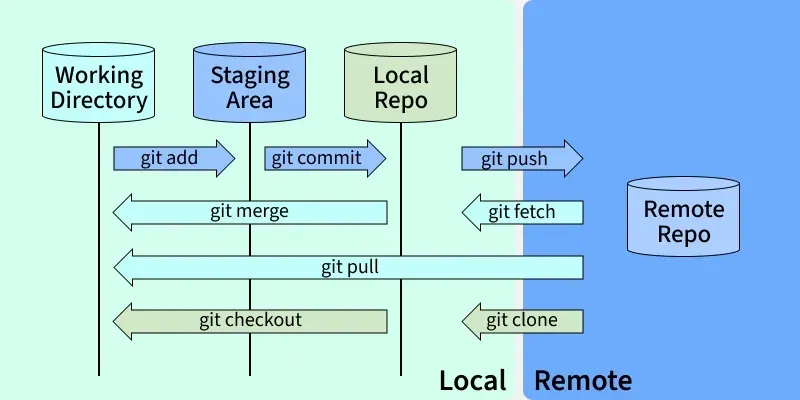
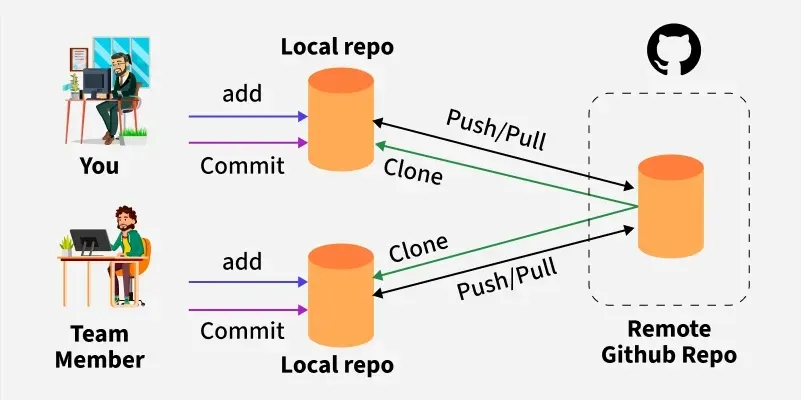
git clone <url>Clone remote repository
git statusCheck file status
3. STAGING & UNSTAGING
git add <file>Stage selected file
git add .Stage all changes
git restore <file>Discard working directory changes
4. COMMIT
git commit -m "message"Commit staged changes
git commit -am "message"Stage + commit tracked files
5. BRANCHING
git branchList branches
git branch <name>Create branch
git checkout <name>Switch branch
git checkout -b <name>Create + switch
git switch <name>Modern branch switch
git switch -c <name>Create + switch (modern)
6. MERGE & REBASE
git merge <branch>Merge branch
git rebase <branch>Rebase onto branch
git merge --abortCancel merge
7. REMOTE OPERATIONS
git remote -vList remotes
git remote add origin <url>Add remote repo
git push -u origin <branch>Push and set upstream
git pushPush commits
git pullPull + merge
git fetchFetch without merging
8. STASH
git stashSave uncommitted changes
git stash popRestore stashed changes
git stash listView stash list
9. LOGS & HISTORY
git logView commit history
git log --oneline --graph --decorateCompact visual log
git show <commit>Show commit details
git diffCompare changes
10. UNDO & FIX
git reset --soft HEAD~1Undo commit (keep staged)
git reset --hard HEAD~1Undo commit (remove changes)
git revert <commit>Safely undo commit